
Let AI summerize this article for you:
 ChatGPT
 Claude
 Gemini
 Grok
Grok Perplexity
Updated on
Key Takeaways:
- SurFast Video Downloader stands out as a top modern replacement for IDM, offering high-speed downloads from over 1,000 sites with support for up to 8K quality.
- Free tools like JDownloader 2 and Free Download Manager provide robust features without any cost, making them ideal for users seeking open-source options.
- Web-based alternatives such as GetVideos.Net eliminate the need for installations, working seamlessly on any device for quick video grabs from popular platforms.
Internet Download Manager (IDM) has long been a staple for accelerating file downloads, capturing videos from streaming sites, and handling interrupted transfers with ease. Its multi-threaded approach and browser integration made it a favorite among power users for years. However, as of 2025, IDM’s outdated interface, compatibility struggles with the latest browsers like Chrome 120+, frequent activation issues, and lack of regular updates have led many to seek superior alternatives. Modern options now offer faster speeds, better cross-platform support, and enhanced video downloading capabilities without the nagging pop-ups or paid licenses.
The rise of these IDM alternatives comes at a perfect time, with tools focusing on everything from general file management to specialized video and audio extraction. Whether you’re looking for free download managers, online video downloaders, or browser-based accelerators, 2025’s lineup provides more reliable and feature-rich choices than ever before.
Here are the 10 best IDM alternatives that are actively outperforming Internet Download Manager right now.
Top 10 Best IDM Alternatives in 2025
1. SurFast Video Downloader – The True Modern IDM Replacement
Supported platforms: Windows 11/10/8, macOS 10.15 and later (including Sequoia)
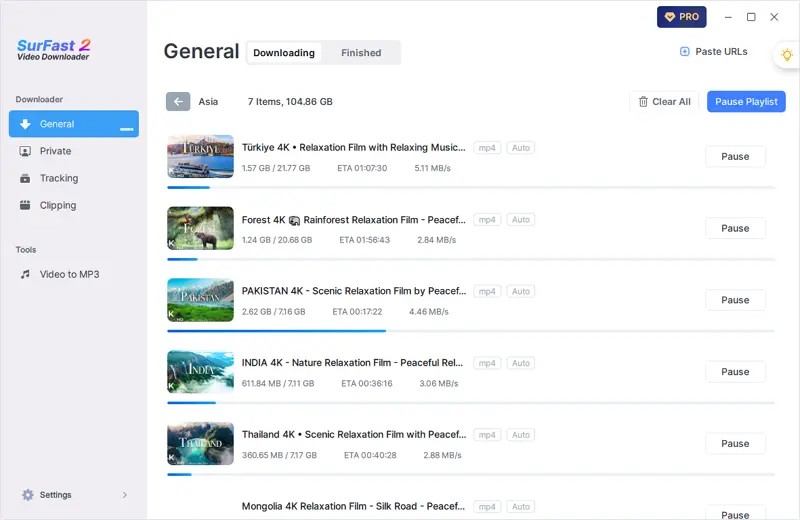
SurFast Video Downloader is a highly versatile tool designed specifically for users transitioning from IDM, emphasizing seamless video and audio extraction from a vast array of websites. It supports downloads from over 1,000 platforms, including major ones like YouTube, TikTok, Facebook, Twitter, and Instagram, allowing users to save content in high resolutions up to 8K and 4K with minimal effort.
The software’s multi-threaded acceleration ensures downloads are significantly faster than traditional methods, and its built-in converter handles formats like MP4, MP3, WebM, and WAV directly during the process. Unlike IDM’s aging system, SurFast receives frequent updates to maintain compatibility with evolving web standards, making it reliable for both casual users and professionals needing batch processing.
Key features
- High-speed downloads with multi-threading for up to 8K/4K videos
- Batch downloading of playlists, channels, and multiple files
- Support for over 1,000 websites including YouTube, TikTok, and Instagram
- Built-in video to audio conversion (e.g., MP3, WAV)
- Secure and ad-free experience with lifetime license options
Pros
- Extremely fast and stable performance
- Wide platform compatibility and regular updates
- Excellent for high-quality video preservation
Cons
- Requires payment for full features (lifetime around $29.95)
- No native Linux support currently
2. JDownloader 2 – The Most Powerful Free Download Manager Ever Made
Supported platforms: Windows, macOS, Linux
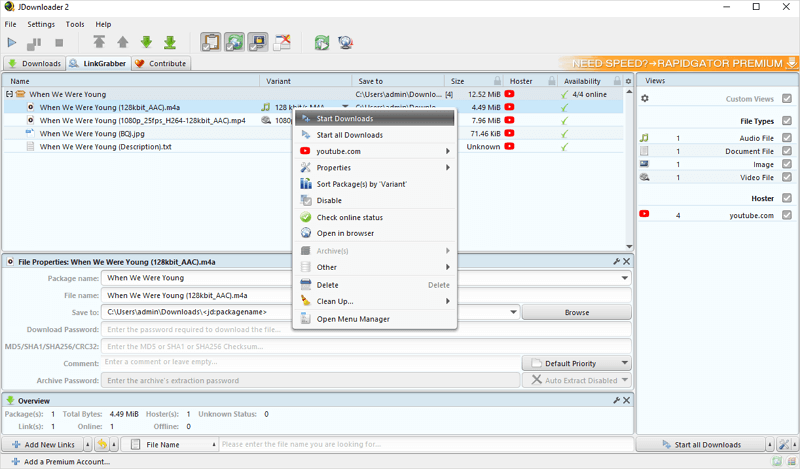
JDownloader 2 continues to dominate the free download manager space as an open-source powerhouse backed by a dedicated community that constantly expands its capabilities through plugins. It excels at handling downloads from thousands of file-hosting sites, automatically solving captchas, and integrating with premium accounts for services like Rapidgator, making it ideal for users dealing with large-scale or restricted content.
Key features
- Plugin system supporting over 10,000 hosts and sites
- Automatic captcha solving and archive extraction (RAR, ZIP)
- Remote control through MyJDownloader web/app interface
- Bandwidth limiting and download scheduling
- Support for premium file-hosting accounts
- Video detection from streaming sites
- Multi-threaded acceleration for faster speeds
Pros
- Completely free and open-source with vast community support
- Cross-platform compatibility on any Java-enabled device
- Handles complex downloads like captchas and archives effortlessly
Cons
- Interface feels outdated and cluttered
- Can be slow to start due to Java dependency
3. Xtreme Download Manager (XDM) – Open-Source Speed Demon
Supported platforms: Windows, macOS, Linux
Xtreme Download Manager, or XDM, remains a go-to open-source alternative for users prioritizing raw download acceleration, claiming up to 5-6 times faster speeds through its smart logic that splits files into multiple segments. It integrates deeply with all major browsers, automatically intercepting links and supporting resumption of broken downloads, which is perfect for unstable connections. Beyond general files, XDM handles streaming videos from numerous sites and includes a built-in scheduler for timed operations. Its lightweight design ensures it runs smoothly on older hardware, and ongoing development keeps it compatible with the latest OS updates. Users appreciate its queue management and dead-link refreshing, making it a reliable choice for batch operations without the bloat of commercial software.

Key features
- Up to 5-6x speed boost with multi-segment downloading
- Browser integration for automatic link capture (Chrome, Firefox, etc.)
- Support for HTTP, FTP, and streaming video downloads
- Download scheduling and speed limiter
- Queue management and broken link resumption
- Built-in video grabber for sites like YouTube
- Batch downloading capabilities
Pros
- Free, lightweight, and highly customizable
- Excellent cross-platform support including Linux
- Strong focus on speed and reliability
Cons
- Video detection can be inconsistent on some sites
- Lacks advanced plugin ecosystem compared to JDownloader
4. Free Download Manager (FDM) – Modern and Ad-Free Accelerator
Supported platforms: Windows, macOS, Linux, Android
Free Download Manager (FDM) has evolved significantly, featuring a sleek, modern interface that appeals to users tired of IDM’s clunky design, while delivering up to 10x speed boosts through multi-threading. It supports a wide range of protocols including BitTorrent, making it versatile for both direct downloads and peer-to-peer sharing. The remote control option via mobile apps adds convenience for managing downloads across devices. FDM’s enhanced media support allows previewing audio and video files during downloads, and its ad-free nature ensures a clean experience. Regular updates have improved compatibility with Windows 11 and macOS Sequoia, positioning it as a top free choice for everyday users.

Key features
- Up to 10x download acceleration
- BitTorrent and magnet link support
- Remote control via mobile app
- Enhanced audio/video file handling with previews
- Bandwidth scheduling and traffic adjustment
- Browser integration for drag-and-drop URLs
- Resuming broken downloads
Pros
- Beautiful, user-friendly interface with no ads
- Broad platform support including Android
- Strong torrent integration
Cons
- Video grabbing less aggressive than dedicated tools
- Occasional minor bugs in mobile versions
5. GetVideos.Net – Best Zero-Installation Online Downloader
Supported platforms: Any device with a modern browser (Windows, macOS, Android, iOS, Linux)
GetVideos.Net shines as a purely web-based video downloader that requires no software installation, making it accessible on restricted devices like work computers or mobiles where apps can’t be added. It supports over 1,000 sites, from YouTube and Vimeo to social platforms like TikTok and Instagram, allowing users to save videos in formats such as MP4, MP3, WebM, and even GIFs. The tool’s ad-free interface ensures quick, unlimited downloads without watermarks or limits. Advanced features like video clipping are available, and its compatibility with all OSes via browsers makes it ideal for cross-device use. Users praise its simplicity for casual downloads, though it lacks batch options found in desktop apps.

Key features
- Support for 1,000+ sites including YouTube, TikTok, and Vimeo
- Multiple format options: MP4, MP3, M4A, WebM
- High-quality downloads up to HD/4K where available
- No registration or installation required
- Compatible with all browsers and devices
- Unlimited and free usage
Pros
- Completely free and works on any device
- Simple paste-and-download process
- Ad-free and unlimited
Cons
- No batch or playlist downloading
- Dependent on internet connection for processing
6. Ninja Download Manager – Stylish Queue Master
Supported platforms: Windows, macOS
Ninja Download Manager distinguishes itself with a visually appealing interface that organizes downloads into color-coded queues, accelerating speeds up to 20x via multiple connections per file. It focuses on sequential writing to ensure files are usable faster, and its pause/resume functionality is rock-solid for interrupted sessions. Browser clipboard integration allows seamless link capturing, while bandwidth controls prevent hogging your connection. Though not as actively developed as some rivals, its preview features for videos make it great for media enthusiasts. Users value its minimalism, avoiding the complexity of tools like JDownloader while delivering professional-grade management.

Key features
- Up to 20x speed acceleration with multi-connections
- Sequential file writing for quicker access
- Pause, resume, and bandwidth control
- Video preview during downloads
- Clipboard monitoring for automatic captures
- Queue organization with color coding
- Support for large file handling
Pros
- Gorgeous and intuitive interface
- Strong speed and queue management
- Affordable one-time purchase
Cons
- Limited to Windows and macOS
- Fewer site-specific plugins
7. 4K Video Downloader+ – YouTube Specialist
Supported platforms: Windows, macOS, Linux, Android (partial)
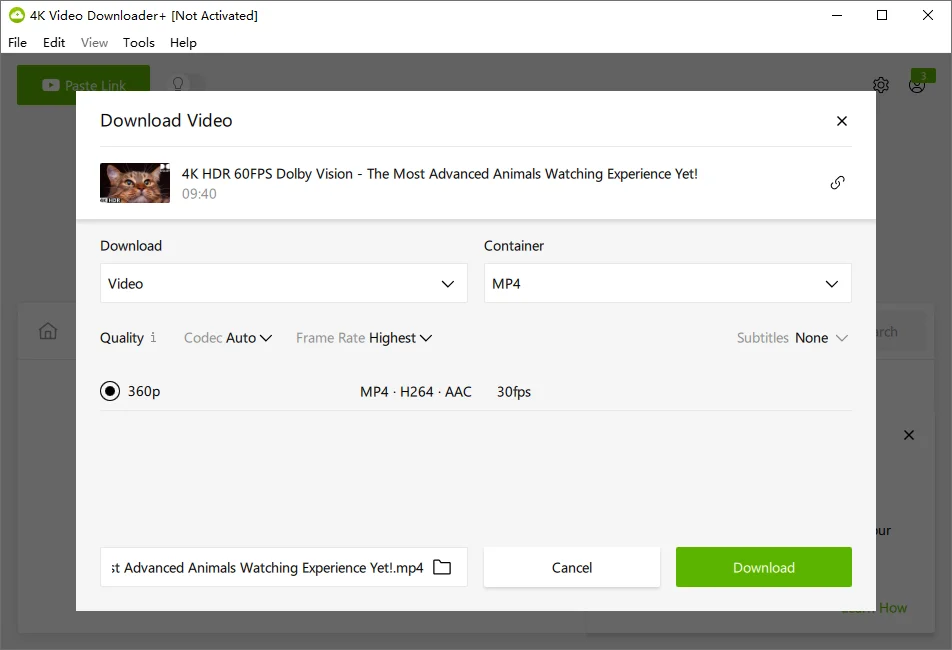
4K Video Downloader+ has solidified its position as the premier tool for high-resolution video downloads, especially from YouTube, with support for entire playlists, channels, and subtitles in one go. Its in-app browser and search function streamline finding content, while Smart Mode applies preset quality settings automatically. Expanded compatibility now includes more sites like TikTok and Vimeo, with audio extraction up to the highest quality. The redesigned interface is user-friendly, and easy management features like proxy support help bypass restrictions. It’s particularly favored by content creators for its reliability in preserving 4K and 8K media without quality loss.
Key features
- Download entire YouTube playlists and channels
- Support for 4K/8K resolutions and subtitles
- In-app browser with built-in search
- Smart Mode for one-click preferences
- Audio extraction in high quality
- Proxy setup for restricted access
- Multi-platform downloads from TikTok, Vimeo, etc.
Pros
- Exceptional for YouTube and high-res content
- Clean interface with easy management
- Reliable updates and support
Cons
- Primarily video-focused, limited general files
- Paid for unlimited features
8. Internet Download Accelerator (IDA) – Classic IDM Rival
Supported platforms: Windows only
Internet Download Accelerator (IDA) persists as a veteran alternative, closely mirroring IDM’s functionality with HTTP, HTTPS, FTP, and BitTorrent support, plus automatic proxy detection for seamless integration. It features a floating download basket for quick additions and site explorer for browsing remote directories. Streaming audio/video playback during downloads adds value for media users. While Windows-exclusive, its category-based organization with auto-detection keeps files tidy. Ongoing updates ensure compatibility with modern browsers, making it a solid pick for users sticking to classic workflows.
Key features
- Multi-protocol support (HTTP, FTP, BitTorrent)
- Automatic proxy and SSL/TSL handling
- Floating download basket for easy additions
- Site explorer for remote browsing
- Streaming media preview
- Category organization with auto-detection
- Browser integration
Pros
- Very similar to IDM’s classic feel
- Strong protocol variety
- Efficient file management
Cons
- Windows-only limitation
- Slightly dated UI
9. DownThemAll! – Browser-Integrated Powerhouse
Supported platforms: Firefox, Chrome (via WebExtension)
DownThemAll! thrives as a free browser extension that embeds advanced download management directly into Firefox or Chrome, enabling users to grab all links, images, or files on a page with customizable filters. Its OneClick mode simplifies bulk operations, while rename masks and subfolder options organize everything automatically. Multi-threaded acceleration boosts speeds without leaving the browser. Ideal for web scrapers or researchers, it handles embedded objects efficiently. Community-driven updates keep it compatible with browser changes, offering a lightweight alternative to full apps.
Key features
- Bulk downloading of links/images with filters
- Multi-threaded speed acceleration
- Rename masks and subfolder organization
- OneClick for quick selections
- Context menu integration
- Queue sorting and management
- Support for embedded media
Pros
- No external software needed
- Highly customizable filters
- Free and browser-native
Cons
- Limited to browser environment
- No standalone app version
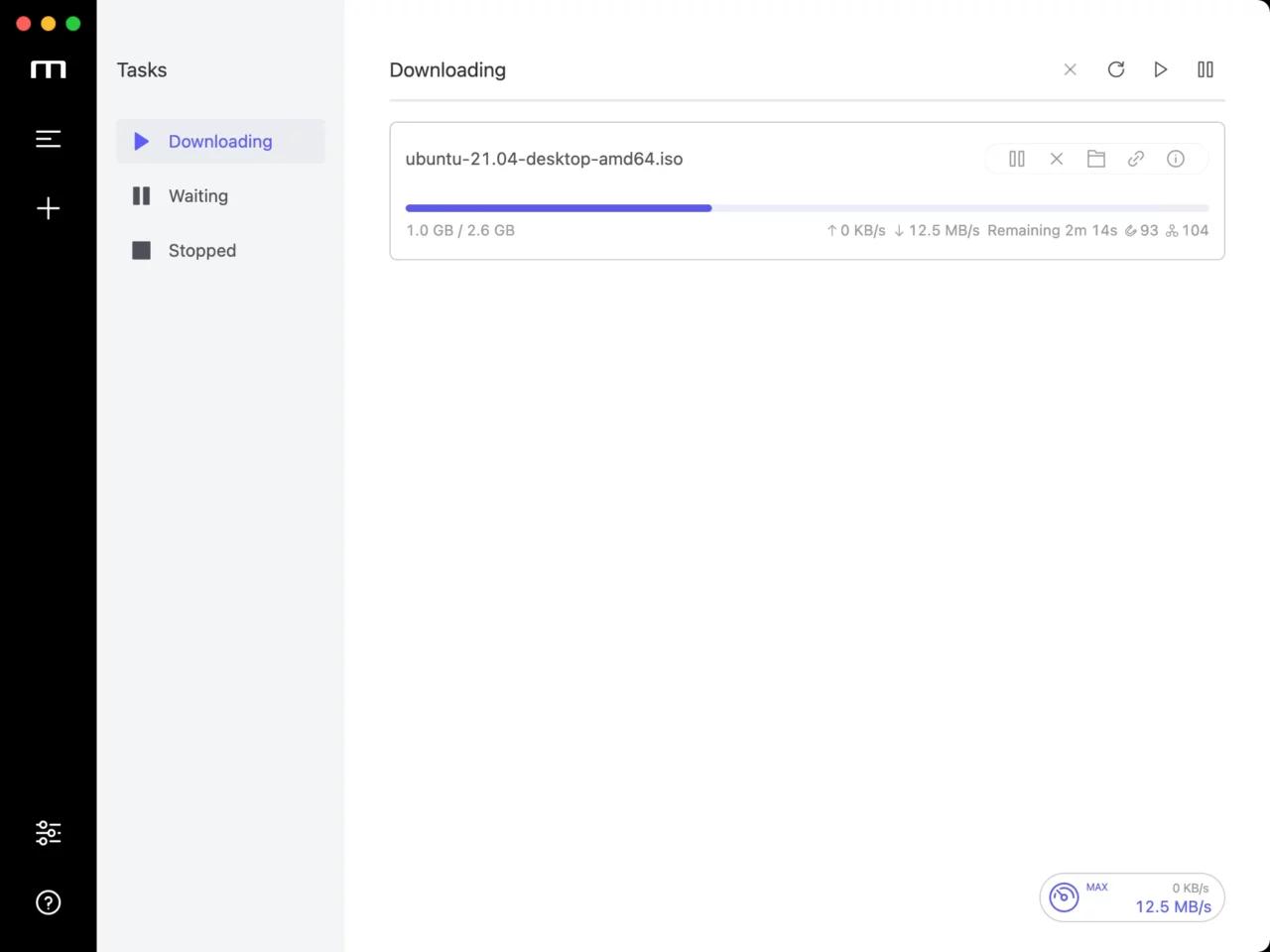
10. Motrix – Minimalist Open-Source Manager
Supported platforms: Windows, macOS, Linux
Motrix stands out for its clean, minimalist design in the download manager category, supporting HTTP, FTP, BitTorrent, and Magnet links with a focus on simplicity and efficiency. It automatically updates tracker lists daily for optimal torrent performance and allows selective BitTorrent downloads. The dark mode and tray support enhance usability across desktops. As an open-source project, it receives community contributions for features like UPnP and NAT-PMP port mapping. It’s perfect for users wanting a no-frills tool that handles diverse protocols without overwhelming options.
Key features
- Support for HTTP, FTP, BitTorrent, Magnet
- Selective torrent downloading
- Daily automatic tracker updates
- UPnP and NAT-PMP port mapping
- Dark mode and system tray integration
- Clean user interface
- Multi-threaded acceleration
Pros
- Simple and modern design
- Full cross-platform support
- Strong torrent features
Cons
- Weaker video detection
- Fewer advanced automations
Comparison Table: IDM vs Top Alternatives (2025)
When choosing an IDM alternative, key factors like platform support, site compatibility, speed, and stability matter most. This table compares the essentials based on 2025 reviews and features, helping you pick the best fit for your needs.
| Tool | Platforms | General Files | Video Sites Supported | Max Speed Boost | Batch/Playlist | Price | Stability 2025 |
|---|---|---|---|---|---|---|---|
| Internet Download Manager | Windows only | Excellent | 500+ | 5–10× | Yes | $25 (lifetime) | Declining |
| SurFast Video Downloader | Windows, macOS | Good | 1000+ | Up to 30× | Yes | $29.95 lifetime | Excellent |
| JDownloader 2 | Windows, macOS, Linux | Excellent | 1000+ | 10–20× | Yes | Free | Very Good |
| XDM | Windows, macOS, Linux | Excellent | 800+ | 5–6× | Yes | Free | Good |
| Free Download Manager | Windows, macOS, Linux, Android | Excellent | 500+ | Up to 10× | Yes | Free | Excellent |
| GetVideos.Net | Any browser | No | 1000+ | 1–5× | No | Free | Good |
| Ninja Download Manager | Windows, macOS | Excellent | Limited | Up to 20× | Yes | $19 | Good |
| 4K Video Downloader+ | Windows, macOS, Linux | No | 500+ (strong YouTube) | 5–10× | Yes | $15–45 | Excellent |
| Internet Download Accelerator | Windows only | Excellent | 500+ | 5–10× | Yes | Free/Pro | Good |
| DownThemAll! | Firefox/Chrome | Excellent | Limited | 5–10× | Partial | Free | Excellent |
| Motrix | Windows, macOS, Linux | Excellent | Limited | 10–15× | Yes | Free | Very Good |
FAQs
Is there a completely free tool as good as IDM?
Yes, JDownloader 2 and Free Download Manager are excellent free alternatives, offering similar or better features like multi-threading and torrent support without any cost.
Which is the fastest IDM alternative?
SurFast Video Downloader often achieves the highest speeds with its advanced multi-threading, surpassing IDM’s limits on supported sites.
Do any of these work on macOS?
Absolutely—SurFast Video Downloader, JDownloader 2, XDM, FDM, Ninja Download Manager, 4K Video Downloader+, Motrix, and GetVideos.Net (browser-based) all support macOS natively or via web.
Can I still use IDM in 2025?
Yes, but users report increasing issues with browser compatibility and stability on newer systems like Windows 11.
Conclusion
The landscape of download managers has advanced far beyond IDM’s capabilities, with alternatives like SurFast Video Downloader providing superior speed, site support, and usability for video-focused tasks. Free options such as JDownloader 2 and Free Download Manager offer unmatched value for general use, while web tools like GetVideos.Net cater to simplicity seekers. Whether you need cross-platform flexibility, high-res video downloads, or browser integration, these IDM replacements ensure faster, more reliable experiences. It’s time to upgrade and leave IDM’s limitations behind.


You May Also Like
-
Best 19 MoviesJoy Alternatives to Watch Movies and TV Shows
Check the free websites like MoviesJoy and pick the best MoviesJoy alternative to watch movies and TV shows online.
Myra Xian Updated on -
10 Best Y2Mate Alternatives to Download YouTube MP3 or MP4
With any of the Y2Mate alternatives, you can easily download YouTube videos to MP4 or convert YouTube to MP3 by link, easy and fast.
Myra Xian Updated on -
Top 13 SolarMovie Alternative Sites for Free Movie Streaming
FMovies, MoviesJoy, and Putlocker are all popular sites like SolarMovie or free streaming. Find your favorite SolarMovie alternative to watch videos online.
Myra Xian Updated on